Role

Role

Product Design, UX Strategy, Prototyping

Product Design, UX Strategy, Prototyping

Client

Client

Self-initiated product concept

Self-initiated product concept

Industry

Industry

Sports / Endurance Tech

Sports / Endurance Tech

Duration

Duration

April – May 2026

April – May 2026

Team

Team

Solo product designer + AI-assisted prototyping

Solo product designer + AI-assisted prototyping

Tools

Tools

Figma, ChatGPT, Claude, Lovable, React, Cloudflare

Figma, ChatGPT, Claude, Lovable, React, Cloudflare

4

Core screens

Core screens

1

Live MVP prototype

Live MVP prototype

30+

Food library items

Food library items

3

Feedback loop questions

Feedback loop questions

PROJECT OVERVIEW

Most cyclists know fueling matters. Figuring out what to eat and when — clipped in, watching their power numbers, and keeping an eye on traffic — is a decision burden they don't want. Keep Pace turns ride conditions and the food in your kitchen into a simple, timed plan, then delivers each prompt at the right moment so you don't have to think about it. The system gets smarter the more you ride, but the experience stays just as simple as day one.

THE ORIGIN

I don't want to think about fueling. I just want to ride.

That's the honest starting point. Not a research finding, not a market analysis — a frustration I hit every time I clip in.

Before a ride, the questions start: What should I eat? How much should I bring? Is two bottles enough, or do I need electrolytes? Should I have caffeine? Is the maple syrup mix enough carbs for a threshold workout?

I have bananas, fig newtons, honey stinger gels, and a jar of maple syrup. I have a rough sense that I should eat something every 30–45 minutes. But every ride is different — a one-hour Zwift interval session has completely different demands than a three-hour Saturday endurance ride — and I end up winging it every time.

The consequence shows up mid-ride. Not as a dramatic bonk, but as a slow fade — the effort that should feel sustainable starts pulling teeth in the third hour. The VO2 intervals I can normally complete become impossible. The surge I need at the end of a group ride just isn't there.

The learning moment was simple: my rides right after lunch always went better than my late-afternoon rides. Same legs, same bike, same fitness. The only difference was what I'd eaten in the hours before. That was when I realized this wasn't a fitness problem — it was a fueling problem. And by the time I felt it failing, I was already too late.

THE PROBLEM

Cyclists don't struggle with knowing that fueling matters.
They struggle with deciding what to do — and when — in the moment.

This is not a knowledge gap. It's a decision burden under physical stress.

Before a ride, the friction is planning: What do I eat? What do I bring? Is this enough? The cognitive tax of figuring this out feels disproportionate to the task, so most riders skip it and default to whatever's convenient.

During a ride, the friction shifts to execution: Should I eat now? Am I already behind? What do I have left? On an outdoor ride, these questions compete with cars, road conditions, shifting gears, braking, and other riders — all while your feet are clipped to the pedals and things are happening fast.

After a ride, there's no feedback loop. You either felt good or you didn't. There's no structured way to learn from what happened, so the same guesswork repeats next time.

The result: underfueling, inconsistent habits, and no repeatable strategy. Riders know they should do better. They just don't want to think about it.

WHY NOT JUST…?

Before designing anything, I tested the alternatives that already exist — both the informal workarounds riders use and the dedicated tools on the market.

"Why not just ask ChatGPT?"

I actually tried this. I'd ask for a fueling plan before a ride, get solid advice, and then... never look at it again. The advice lived in a chat thread I wouldn't reopen. It wasn't connected to my ride, my timing, or the food I actually had. And I'd have to repeat the process from scratch every time.

The insight: Static advice doesn't solve dynamic decisions. The problem isn't generating a plan — it's delivering the right action at the right moment.

"Why not use a spreadsheet or carb calculator?"

You could calculate carbs per hour and total intake targets. But knowing "60g carbs/hour" doesn't tell you when to unwrap a gel while riding at 28 km/h with a car behind you. The translation from number to action is where it falls apart.

The insight: Knowing targets ≠ executing them under stress.

"Why not use EatMyRide or Fuelin?"

These are real, serious tools — and I researched them thoroughly. EatMyRide creates personalized nutrition plans using your FTP, VO2Max, and route data. It can sync to a Garmin and deliver real-time prompts during rides. Fuelin provides daily nutrition coaching adapted to your training. Hexis is used by WorldTour pro teams for carb periodization.

They work — for riders who are willing to invest in them. EatMyRide requires Garmin pairing, Connect IQ installation, Bluetooth syncing, and route pre-loading. Its food database is built around branded sports nutrition products. Reviewers note the setup complexity. Users flag the limited food database. The real-time features are Garmin-dependent.

These tools answer: "How should I optimally fuel this ride?"

That's a valid question. It's just not my question.

The insight: These tools inform — but they don't remove decision-making. They pass complexity through to the rider as features and data fields. For the rider who will never pair a nutrition app to a bike computer, never log a meal, and just wants to stop feeling terrible in hour two — they're overbuilt.


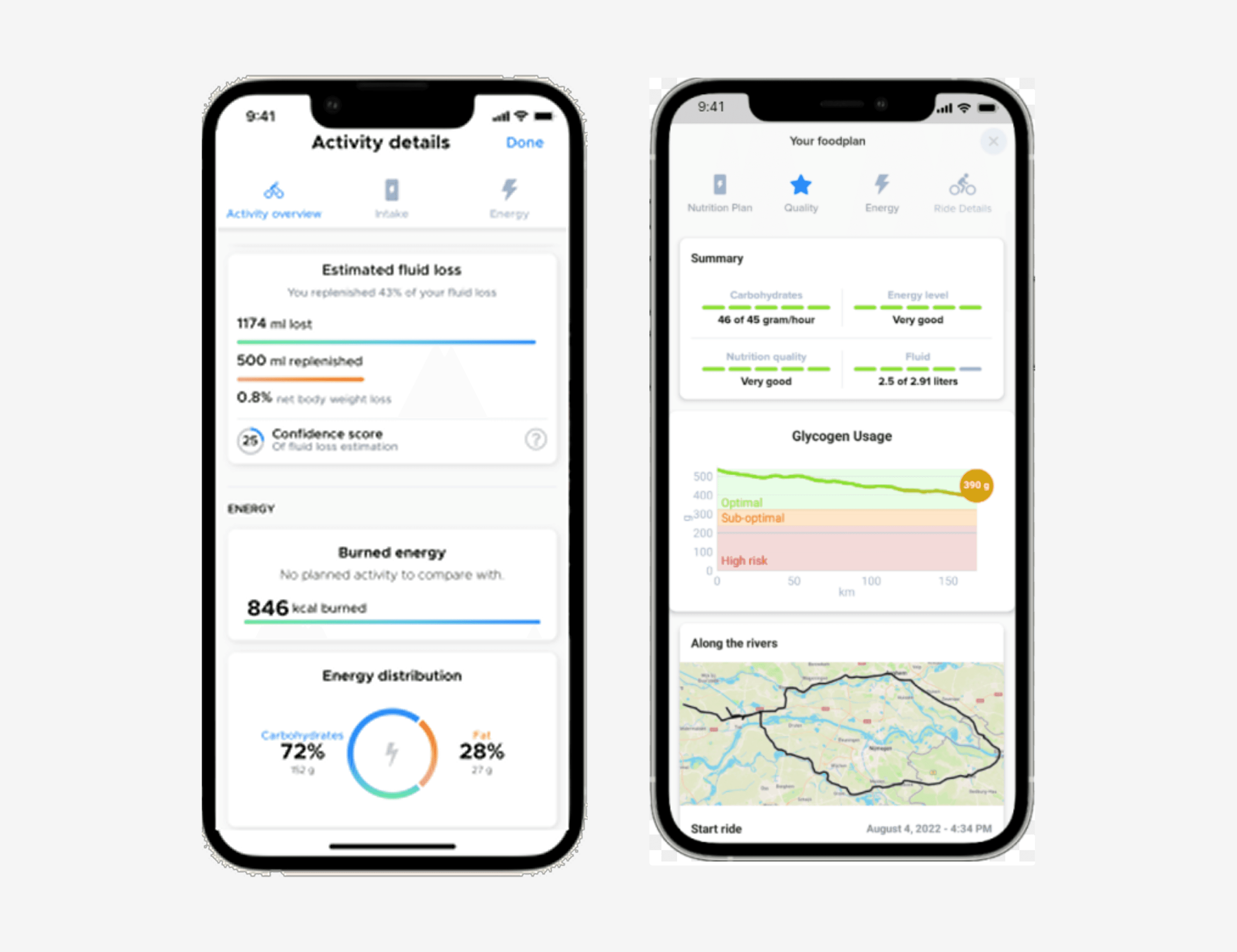
EatMyRide activity details screen — fluid loss percentages, confidence scores, energy distribution charts

EatMyRide's "Activity Details" screen — capable, but cognitively heavy. Three tabs, four metrics, two confidence scores, and a donut chart for a single ride. This is what answering "how should I optimally fuel?" looks like in practice.

[VISUAL: Competitive landscape summary — EatMyRide vs. Keep Pace comparison matrix. Link to full competitive analysis.]

THE OPPORTUNITY

Design a system that eliminates decision-making by translating context into action.

Not: "What's optimal?"
But: "What should I do right now with what I have?"

The gap in the market isn't "no one does cycling nutrition." EatMyRide proved the concept works. The gap is that no one treats this as a pure decision-elimination problem for the rider who wants simplicity above all else.

Keep Pace's opportunity is to serve riders who fall through EatMyRide's floor.

KEY DESIGN TENSION

Optimization vs. Familiarity

Early in the concept, I explored a more data-rich direction: precise carb targets, grams-per-hour tracking, optimized fueling curves, ideal product recommendations. It looked like a performance dashboard.

I killed it.

The problem wasn't that it was wrong — it was that it required the rider to interpret data while under physical stress. And the food recommendations assumed ideal products, not the bananas and fig newtons actually sitting on the counter.

The decision: Familiarity Over Optimization.

Use foods the rider already has. Accept "good enough" fueling. Prioritize execution over precision.


Optimization Model

Familiarity Model

Accuracy

Precise

Practical

Adherence

Lower (complex)

Higher (simple)

Cognitive load

Heavy

Light

Real-world resilience

Fragile

Resilient

The strategic choice: Adherence beats perfection. A plan you actually follow is worth more than a perfect plan you ignore.


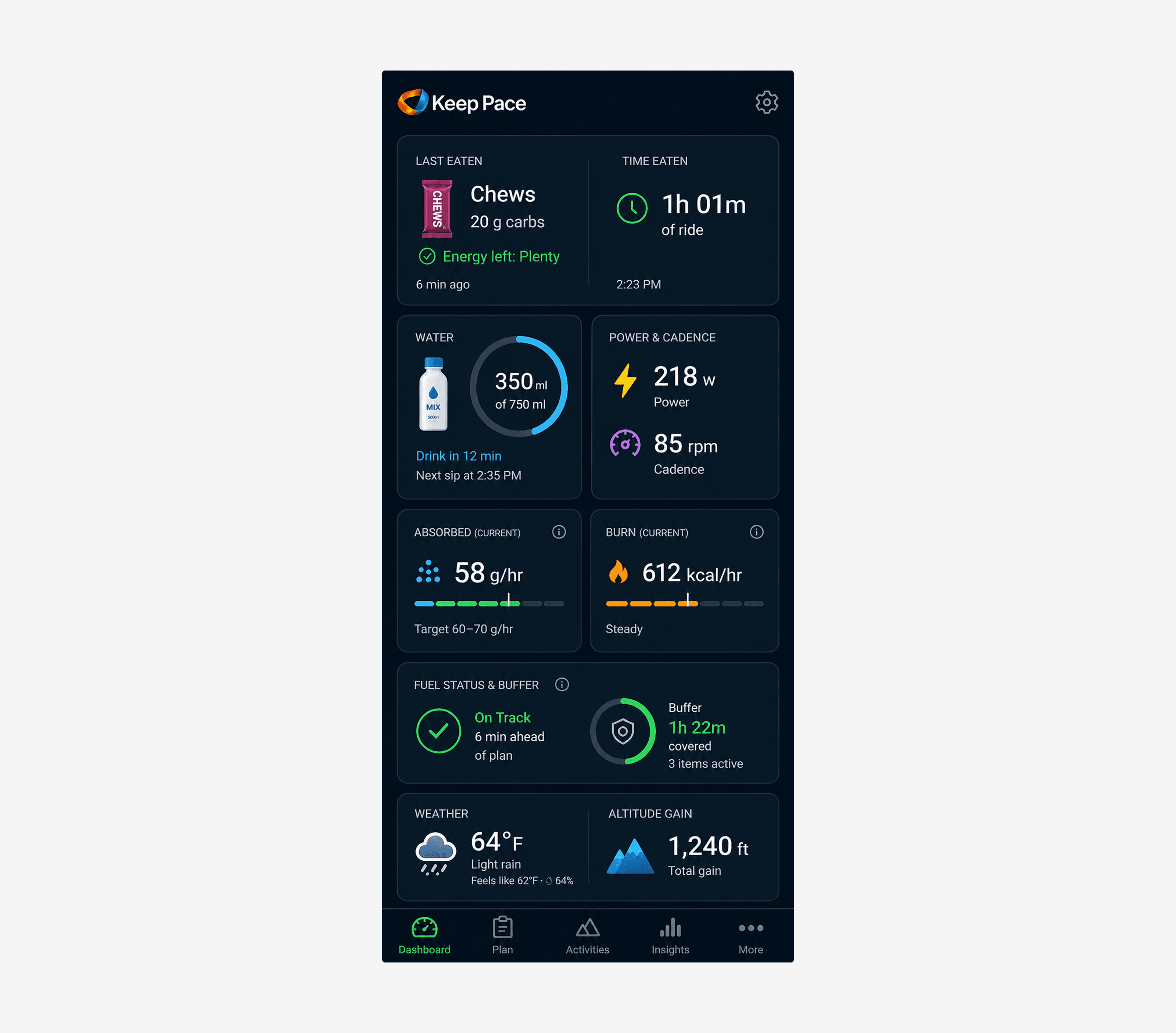
Killed concept — the optimization-mode dashboard with eight metric cards

The killed concept — eight metric cards surfacing real-time gram tracking, burn forecasting, weather, altitude, power, and cadence. Every card was competently designed in isolation. Together, they failed the rider in the moment that mattered most: the moment of glancing at the screen while clipped in.

More accurate data made the product worse. That was the moment I knew this direction was wrong — when sophistication was actively harming the rider's ability to act.

The temptation toward this direction was real. The data is knowable — power, cadence, absorption rate, burn — these are all quantities a sophisticated nutrition product could surface. The discipline was asking the harder question: not "what does our system know?" but "what does the rider need to decide right now?" That single reframe was the difference between an optimization product and a decision-elimination product.

THE CUPBOARD REFRAME

From "What should I eat?" to "What do I have?"

The strategic choice above had to express itself somewhere concrete. The first place it showed up was in the planning experience.

The original framing seemed obvious:

"How might we help riders calculate what they need to eat during a ride?"

But through exploration, the stronger framing became:

"How might we help riders turn the food they already have into a ride-ready fueling plan?"

That shift mattered because most riders don't think in nutrition categories while getting ready for a ride. They think in real-world inventory: "I have a banana. I have chews. I have maple syrup. I have a PB&J, but no gels."

The opportunity wasn't to teach the rider how to build a nutrition plan. It was to let the rider quickly identify what they had available, then let the system translate those items into coverage, timing, substitutions, and order.

The insight: Riders know their cupboard better than they know their fueling model.


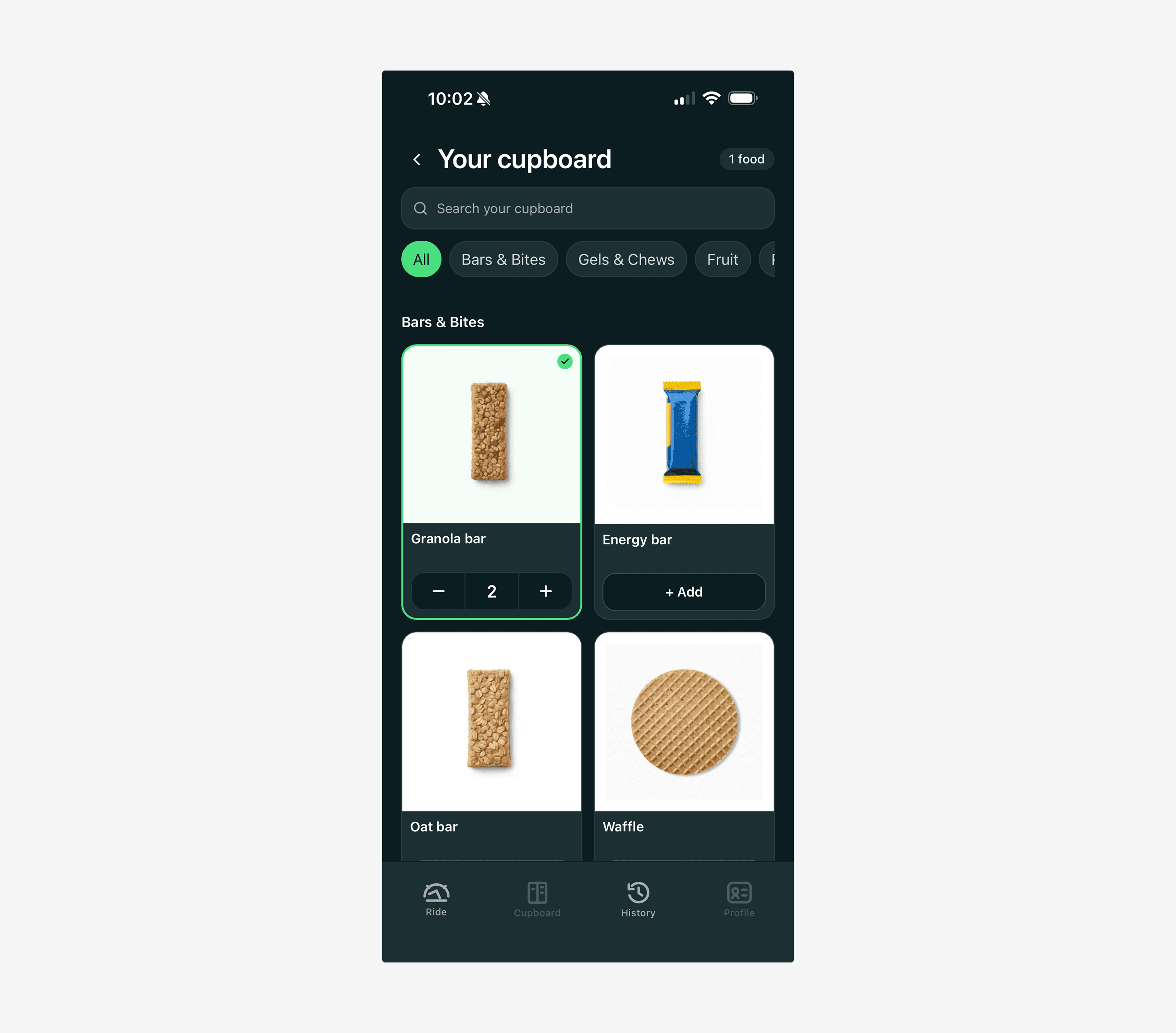
Keep Pace cupboard food library — real foods, not nutrition categories

The cupboard library — real foods, not nutrition categories. Riders see what they recognize; the system handles the classification.

How the System Hides Complexity

Instead of asking riders to choose "fast carbs," "slow carbs," "electrolytes," or "carbs per hour," Keep Pace asks a simpler question: What do you have?

The cupboard's filter row defaults to grocery-style categories — Bars, Gels, Fruit, Real Food, Snacks, Drinks — because that's how riders actually think about their kitchen. The same row also exposes plain-language fuel roles (Quick fuel, Steady fuel, Long fuel) at the far right, available but never demanded. New riders browse by grocery; over time, after seeing recommendations name those roles and seeing the filters used, they internalize the system vocabulary and start reaching for it directly. Progressive disclosure of system vocabulary — the product reveals its own language on the rider's timeline, not the product's.

Internally, every item carries both axes — a grocery category for placement, a fuel role for the planner:

  • Quick fuel: gels, chews, candy, maple syrup, honey, sports drink

  • Steady fuel: bananas, PB&J, rice cakes, energy bars, dried fruit

  • Long fuel: trail mix, nut butter, nuts, whole grain bread

  • Hydration: water, electrolyte mix, sports drinks

The interface stays human and familiar. The system handles the nutrition logic.

This is a real architectural tradeoff — and one worth naming. Most teams would build nutrition-category selectors because that's what the underlying data wants. The cupboard model requires a translation layer that maps real foods to fuel roles, plus a hybrid filter taxonomy that lets riders see the model in their own language while the planner uses its own language. More engineering work, more edge cases, more responsibility on the system. I chose the harder backend so the frontend could be simpler. That's the "absorb complexity, deliver simplicity" principle expressed at the system level — not just a UI choice, but a decision about where complexity should live.

Building the Cupboard — How Items Get Added

The cupboard starts populated. A default library of the most common cycling foods — gels, chews, energy bars, bananas, dates, rice cakes, electrolyte mix — is pre-loaded by the system. Most riders will recognize their staples immediately and can build a plan without adding anything on day one.

When a rider needs to add something not in the defaults, two paths exist. Barcode scan identifies the item — name, food type — and the system maps it to the appropriate curated image and fuel role. If no UPC is detected, the rider provides a name and answers a single prompt ("How do you usually take this — on the go, or during a natural break?"). Manual add works the same way: pick an image from the curated library, provide a name, answer the prompt. Either way, the system does the classification. The rider never touches a nutrition label.

One decision worth naming: no user photo uploads.

Allowing riders to photograph their own food items was considered and cut. The instinct makes sense — a photo of your actual bar feels personal. In practice it would immediately break the visual grammar the product depends on. Different lighting, backgrounds, crops, and orientations would make the cupboard feel inconsistent — and more critically, would compromise legibility on the in-ride screen, where food images appear inside tracker rings at small sizes, under physical stress, at a glance.

The curated library is the answer. Every item maps to a consistent, designed representation regardless of how it was added. The UPC scan or manual prompt identifies what it is; the curated image determines how it looks. This is the same discipline that governs the visual system overall — consistency across surfaces isn't an aesthetic preference, it's a functional requirement. An image that reads clearly in the planning screen has to read just as clearly when it appears inside a depleted ring mid-ride.

The library's known edge cases are real-food items — PB&J, rice cakes, homemade bakes — and branded drink mixes, where the generic representation can feel imprecise. These are scoped for library expansion, not treated as gaps in the model.

A note on scope. The cupboard management screen — adding, editing, and deleting personal items — is designed and accounted for, but deferred from the MVP. The default library covers the most common cycling foods and is enough to prove the core loop. Full management is a Phase 2 surface: real, planned, not yet built. The right call for an MVP is to not let a well-designed edge case delay the thing worth testing first.

One small detail that earns its keep. The bottom of the cupboard management screen carries two optional actions: Save and Let's Go. The second one matters more than it looks. A rider who opens the cupboard to update their pantry before a ride — adds a new bar, removes something they've run out of — shouldn't have to navigate back to the Ride tab to start planning. Let's Go takes them there directly. It's a shortcut that most users will never consciously notice, and will immediately miss if it isn't there. That's the right kind of invisible.

The Live Planning Flow

The rider enters basic ride context — where they're riding, how long, and how hard — and selects available items from their cupboard. As items are added, Keep Pace updates three things in real time:

  1. Coverage — whether fuel and hydration are sufficient for the ride

  2. Recommendations — what item type would improve the plan

  3. Ride plan — the optimal order and timing of selected items

The rider never manually orders items. They tell the app what's available. The plan reorders itself.

[VISUAL: Step-through flow — empty state → user adds hydration → user adds steady fuel → user adds quick fuel — showing the plan reorganizing itself at each step]

Recommendations in Plain Language

When the rider is almost covered, the app doesn't say "add more food." It identifies the kind of support the ride needs and routes the rider directly to the matching items in their own cupboard — not generic suggestions, not a static text preview.

Add 1 Quick fuel item — best for hard efforts or the second half of this ride.
[ Browse Quick fuel ] [ Not now ]

Tapping Browse Quick fuel opens the rider's cupboard with the Quick fuel filter pre-applied. They see real photographs of their actual items — chews, gels, candy, maple syrup — and pick what they have. The recommendation and the cupboard share vocabulary so the connection from "what's needed" to "what I have" is one tap.

The cupboard surface also carries the recommendation's why across — a single quiet line above the food grid reads "Add 1 Quick fuel item for the harder second half." — so the rider doesn't have to remember the rationale once they've left the planning screen. Different surface, same thread. Cross-surface continuity is one of the unglamorous structural choices that makes a calm system feel calm.

This is meaningfully different from asking "Do you have any fast carbohydrates?" The rider sees plain-language categories and recognizable foods. The nutrition science stays in the system.

Optimal First. Practical Always.

A core principle of the cupboard model: if the rider doesn't have the ideal item, the app should not block them or make them feel unprepared. It should create the best possible plan from what they actually have.

If a ride would benefit from quick fuel but the rider has no gels, chews, or candy, Keep Pace adapts:

No Quick fuel selected. We'll move your banana earlier and split the PB&J into two smaller portions. These are steadier fuels, so we'll place them earlier to give your body more time to use them.

The tradeoff is explained in plain language. Trust is preserved without overwhelming the rider with nutrition science.

"Not Now" — Respecting Rider Agency

Sometimes the rider doesn't have the recommended item. Sometimes they don't want to add more. Sometimes they're willing to proceed with a less-than-perfect plan. The recommendation module respects this with a Not now option.

Add 1 Quick fuel item — [Browse Quick fuel] [Not now]

If the rider chooses Not now, Keep Pace dismisses the recommendation, optimizes the plan with what's already selected — re-ordering items, splitting larger portions, moving steadier fuels earlier — and lowers the confidence state without creating alarm:

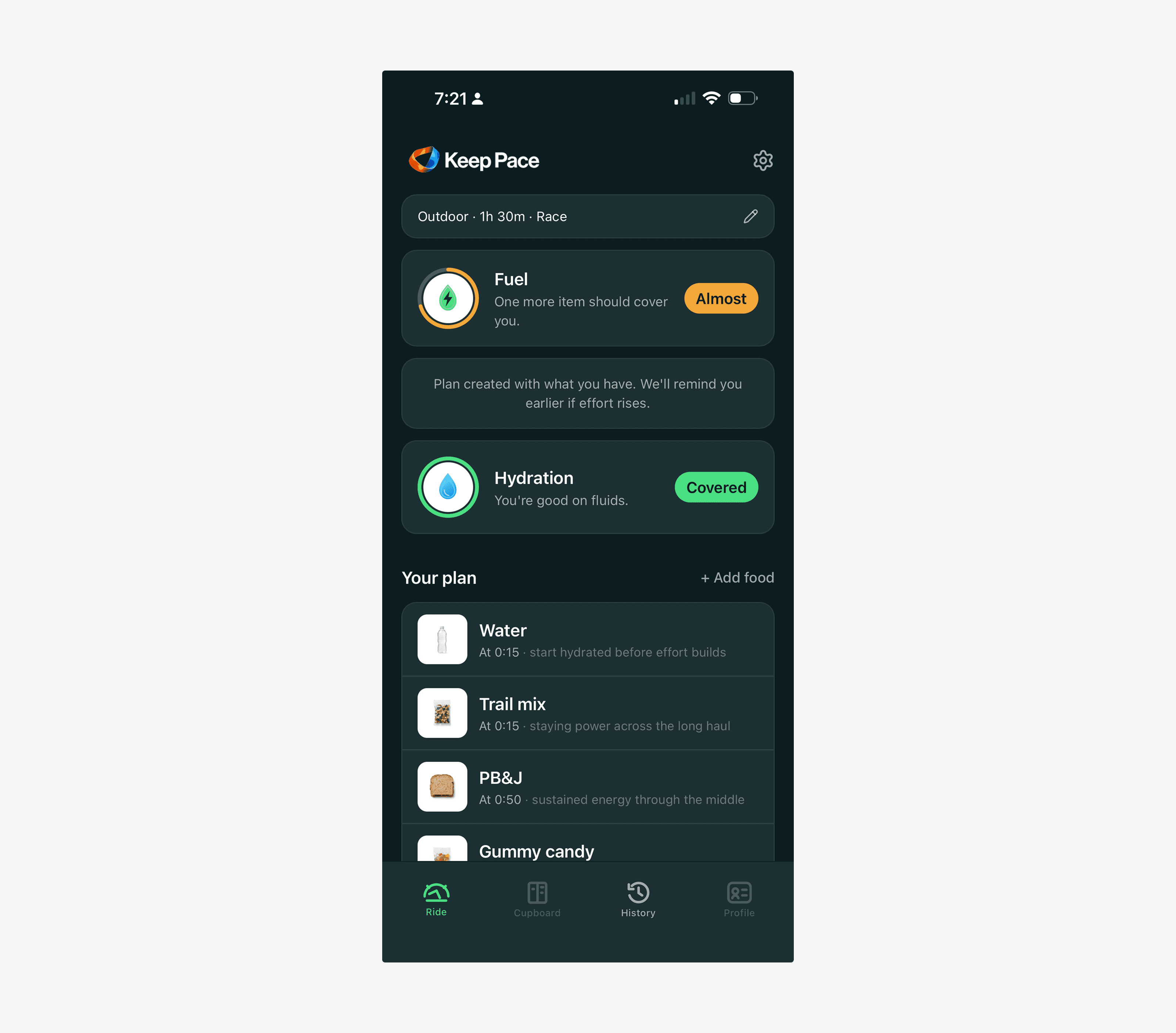
Plan created with what you have. We'll remind you earlier if effort rises.

The app stays supportive, not prescriptive. The rider decides. The system adapts.

What got cut — "Use backup"

The recommendation module didn't start at two buttons. The first version had three:

Add 1 Quick Fuel item — [Add item] [Use backup] [Not now]

The middle button — Use backup — was meant to mean "let the system optimize with what's already on the plan." The intent: if a Quick fuel item was missing, tapping Use backup would tell the app work with what I have — move the banana earlier, split the PB&J — without forcing the rider to go find more food.

But "backup" is vague. It reads as a different food I'm holding in reserve — implying a kind of inventory the rider was supposed to maintain. The word didn't communicate the optimization behavior I was trying to hide behind it. And the optimization behavior was already what Not now triggered: proceed without the recommended item, let the system rebalance.

Two affordances doing the same job. One of them mislabeled. The fix was to cut Use backup entirely and consolidate the optimize-with-what-you-have behavior under Not now. The recommendation module went from three buttons to two: a primary that says exactly what tapping it does (Browse Quick fuel) and a tertiary escape hatch that does the rebalancing work (Not now).

This is the design judgment that doesn't show up in finished mockups — noticing when a button you wrote is doing two jobs poorly, or when two buttons are doing the same job under different labels. The first instinct is usually to add more controls. The discipline is to remove them.

Done — Earned Confirmation

The Cupboard's primary CTA — Done · 4 items — turns green when the rider has items selected. That worked fine in the linear path: open the Cupboard empty, add items, the button greens up, tap to confirm.

It broke the moment the rider arrived from a recommendation. Tapping Browse Quick fuel lands them in a filtered Cupboard view with their existing selections already on the plan, so the button was green on arrival. You're done — except they had just been told, on the previous screen, that something was missing. The button was answering the wrong question. It was reading their inventory, not their intent.

The fix was a state model the user can't see but can feel. On mount, the button takes a snapshot of the current item count and renders as a quiet secondary outline regardless of what's already selected. The instant the rider adds one new item this session, it turns green. The label never changes — Done · 4 items through the whole interaction — only the visual weight does.

Done · 4 items → add one item → Done · 5 items

The principle the decision expresses: an affordance should reflect what the rider has done in this moment, not what the system happens to know across all moments. A green button at entry is the system bragging. A green button after the rider's first new tap is the system acknowledging. The first feels mechanical; the second feels earned.

It's a small thing — one snapshot, one outline-vs-filled swap — and one of the kinds of details a rider would never name but would feel as the product paying attention.

Hydration as a Required Layer

A combined "good to go" score would be misleading. A rider can have enough calories but not enough fluid. So Keep Pace separates the two:

Fuel — Almost covered
Hydration — Covered

Hydration is treated as a required part of every ride, not an optional cupboard item. Recommendations are based on ride length, indoor vs outdoor, effort, and (when available) temperature and humidity. But again, the technical data stays in the system. The rider sees plain action: Bring 2 bottles — 1 water + 1 electrolyte mix.

Food can be substituted. Hydration is handled more firmly. That's a deliberate asymmetry — and the right one.

A small scheduling decision sits underneath this. In an early build, the first hydration prompt fired at minute 0 — the moment the ride started. Functionally correct: the rider is on the bike, hydration matters, prompt the drink. Narratively wrong: opening a ride with "drink your water" interrupts the psychological start of the ride before it's begun. Minute 0 is go. It is not consume. I shifted the first hydration cursor to minute 15 — far enough in that the body is warm and the rider has settled, early enough to matter — with subsequent bottles every 60 minutes after (15, 75, 135…). The change is invisible to the rider and produces a more natural ride arc: settle in, then fuel, then hydrate.

Why This Was the Right Call

Existing tools show nutrition data and require the rider to interpret it. Keep Pace shifts the interaction from analysis to decision support.

The rider doesn't need to know which items are fast carbs, how many grams per hour they need, how to order foods, when to substitute, or how hydration changes by ride type. They only need to answer one question — What do you have? — and the system does the rest.

This became the bridge between the product's intelligence and its simplified in-ride interface. The same philosophy that drove "Familiarity over Optimization" at the strategy level showed up here at the planning level — and would show up again in the in-ride screen.

DESIGN PRINCIPLES

1. Zero Cognitive Load During Effort

No numbers required mid-ride. No decision-making required. Only clear actions. If you have to interpret it, we failed.

2. Familiarity Over Optimization

Use foods the rider already knows and has. Avoid "ideal but unrealistic" recommendations. Work with reality, not theory.

3. Context > Precision

"Good enough and usable" beats "perfect but complex." A banana at the right time matters more than precisely calibrated maltodextrin ratios.

4. Progressive Disclosure

Planning = detailed. Riding = minimal. Recovery = insightful. The interface adapts its density to the rider's cognitive availability.

5. Absorb Complexity, Deliver Simplicity

As the system matures — adding weather data, location prediction, ride history — it gets smarter without the rider's experience getting more complex. Sophistication lives in the system, not the interface.

6. Optimal First. Practical Always.

The system aims for the ideal plan, but never blocks the rider when reality falls short. If the right food isn't available, Keep Pace adapts — re-orders, substitutes, explains the tradeoff in plain language. The rider is always supported, never lectured.

DESIGNING THE IN-RIDE SCREEN

The "Eat Now" moment is the product's signature interaction. Getting it right took three distinct attempts — and the path through them is where most of the actual design judgment in this project lived.

Concept 1 — Card as Energy Canvas

The first concept was conceptually beautiful: each food item was a vertical card whose background served as the absorption indicator. Freshly eaten food filled the card with green. As digestion progressed in real time, gray overlaid from the top down — visually consuming the food alongside the rider. Cards flowed downward over time, telling a literal story of energy entering and being used.

What worked: Strong conceptual model — fueling as a system you could see. Visually distinctive. Reinforced the metabolic story without explanation.

What didn't: Background-based data is harder to read under physical effort than foreground signals. The rider had to interpret a fill level inside a card, and at a glance — at speed, with elevated heart rate — that interpretation was slower than it needed to be. The metaphor was elegant. The execution under stress was not.

The insight: Background-based data is harder to parse under effort than foreground signals. This became the design constraint for the next iteration.

Concept 2 — Progress Ring

I shifted the absorption indicator out of the card background and into a foreground progress ring around each food item. Familiar pattern. Instant readability.

What worked: Faster scanning. Clear at a glance. No interpretation required.

What didn't: The system narrative — energy as flow over time — was lost. Each ring was a moment, not a story. The rider could see how much fuel was left but not how it connected to the rest of the ride.

Final — Hybrid System

The final design layers four elements, each earning its place:

Element

Job

Progress ring

Instant readability — "how much energy do I have?"

State chip ("Full / Plenty / Half / Low")

Translates data into human language

Neutral card

Provides structure without competing for attention

Depleted stack

Acknowledges past items in a single quieted row — same circular shape as the active items, just unfilled. Information-only; not interactive.

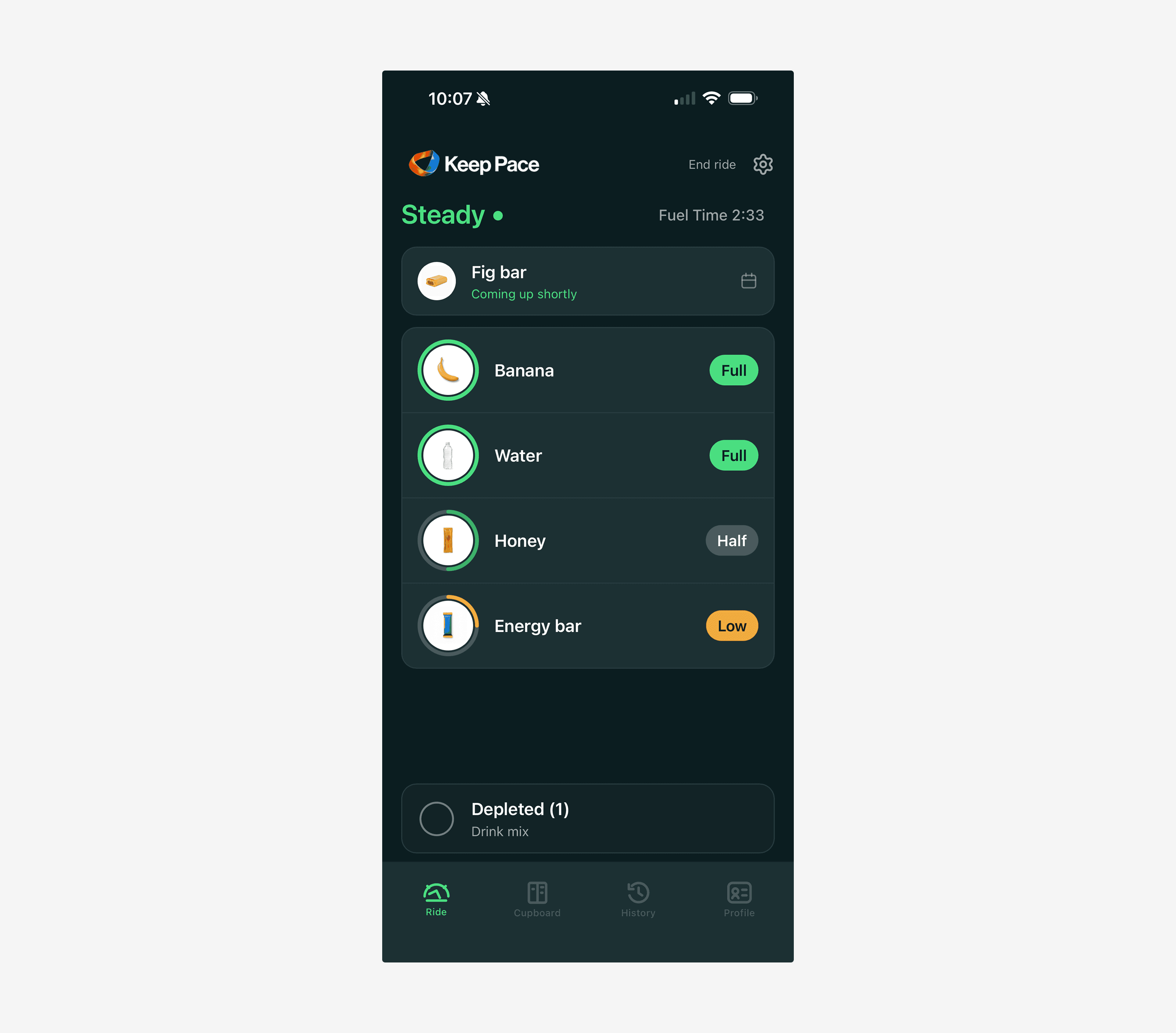
The ring gives the data. The chip gives the meaning. The card gives the structure. The depleted stack respects that not all information deserves equal visual weight — past items are acknowledged but quieted so the rider's attention stays on what's active.

Details That Earned Their Keep

A few craft choices in the in-ride layer worth naming — where the difference between "looks fine" and "works under stress" actually lives.

Stepped fills, not continuous. The progress ring uses four discrete states — 100% Full, 75% Plenty, 50% Half, 25% Low — rather than a continuously animating gauge. Continuous fill creates a fuzzy region where the rider has to mentally calibrate "where am I within this tier?"; stepped removes that work. Less precision, more glanceability. The absorption math still runs under the hood — the screen just doesn't surface it.

One shape, three states. Every circular element — the next-up thumbnail at the top, the four active progress rings, the depleted ring at the bottom — shares the same form and centers on the same vertical line. The shape persists; only fill state changes. The rider reads coming-up → active → depleted as one continuous lifecycle, not three different UI components. The vertical alignment is the structural choice that makes the lifecycle legible — the kind of detail that's invisible when it's right and conspicuous when it's not.

No expand on the depleted stack. An earlier version had a hamburger icon that expanded depleted items for inspection. I cut it. Mid-ride, the rider has no reason to inspect a depleted item — that belongs in post-ride reflection. More importantly: every interactive affordance is a tiny "should I tap this?" decision the rider has to dismiss. The empty-ring icon replaced it because it carries the right semantic — same object as an active card, just at zero — without inviting a tap.

Depleted stack is pinned, not flowed. Originally it sat in document flow beneath the active cards. The problem only surfaced live: when a new active item appeared, the depleted card jumped downward — a layout shudder at exactly the moment the rider was glancing for stability. Pulling it out of flow entirely fixed it. The depleted card now sits fixed at the bottom of the viewport with a subtle backdrop blur and hides when the eat-now sheet rises. Active material lives in the scroll. Ambient material holds its ground. Some information is for glancing, not acting — and the layout has to make that distinction visible.


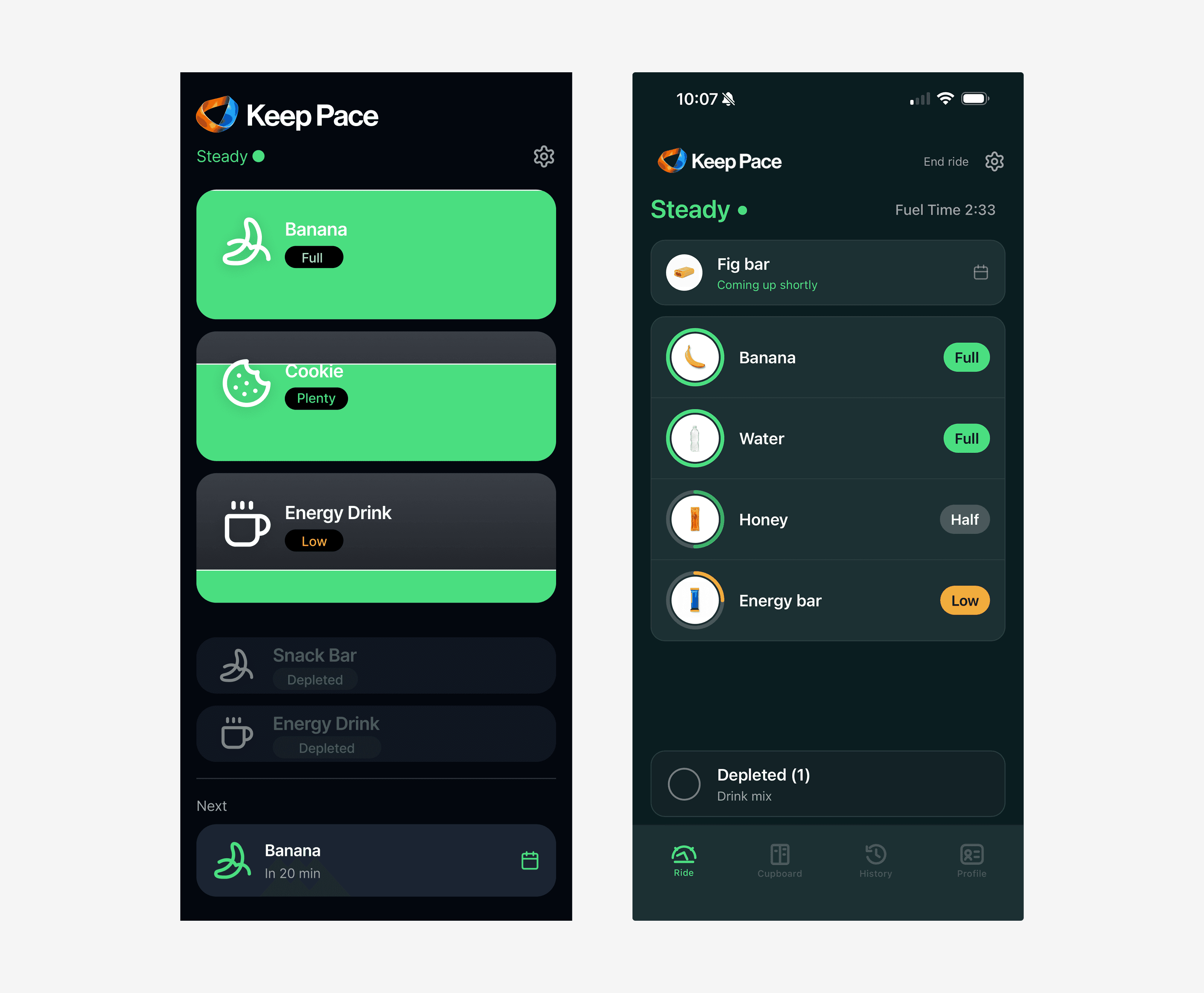
Final in-ride screen — ring + chip + neutral card + depleted stack

The final hybrid in-ride screen. Ring, chip, neutral card, depleted stack — four layers earning their keep. Status word at the top ("Steady") and the next item queued at the bottom ("Banana — In 20 min").

[VISUAL: Three-panel iteration showing Card-as-Canvas → Progress Ring → Hybrid, with the "what worked / what didn't" callouts beneath each]

Refining the Eat-Now Sheet

Once the in-ride layout settled, the eat-now prompt went through its own round of refinement. The first version was a compact overlay with a role-based color bar — amber for quick fuel, green for steady — and no scrim. It looked tidy on a static screen. In context, it read as a notification, not a moment. Each refinement that followed was small in isolation and load-bearing for how the prompt actually feels in the saddle.

Promoting the prompt to a real sheet. The compact overlay became a full bottom sheet with a drag handle and the same slide-up motion as the planning ReadySheet. Reusing the pattern was the point: the rider already knew what a sheet meant — it was the same gesture that had carried their plan into the world before the ride started. One vocabulary, two surfaces.

Cutting the role-based color bar. At the moment of eating, quick fuel vs steady fuel isn't a decision the rider is making — the system already made it. The bar was teaching a taxonomy they didn't need, adding visual noise in exchange for nothing actionable. Roles still drive the planner. They no longer dress the prompt.

Removing the redundant heading. The first sheet opened with Time to eat. The status word at the top of the canvas also read Time to eat. Same phrase, twice on screen, simultaneously — treating the rider as if they hadn't already seen it. I cut the heading entirely. The sheet sliding up is the time-to-eat moment; it doesn't need to announce itself. The food name — Banana — takes the hero slot and answers the only question that remained: what.

Color as a thread, not a repetition. I tested carrying the status amber into the sheet. It read literal — the same color shouting twice. The cleaner answer: let the top stay amber, the sheet stay neutral, and let motion and proximity link them. A single colored beacon says act more clearly than two competing amber surfaces.

Locking the top row to the prompt. The status row had been showing the next queued item — a lookahead. When the eat-now sheet rose, the top row named one food, the sheet named another. Two surfaces, two stories. The fix was a state rule: when an eat-now item exists, the top row locks to it and switches to "Now" in amber. Top and bottom always tell the same story.

A tap on the shoulder, not an alarm. The screen lighting up assumes the rider is looking. Outdoors at speed, they often aren't — eyes on the road, on a wheel, on a power number. A double-pulse vibration (80ms on, 60ms off, 80ms on) fires when the sheet opens via the Vibration API, feature-checked to fail silently on iOS Safari. A single long buzz reads as alarm; the double short pulse reads as a tap on the shoulder. Quiet enough to be on by default, present enough to recover attention when eyes are elsewhere.

Words Over Numbers

The clearest example of designing for stress over precision: the up next row originally showed a numeric countdown — Up next in 14 min — driven by the same adaptive estimate that fires the prompts.

The rider's note when they saw it on the road: "Watching the countdown on the coming up is unnerving. Can we use words?"

That feedback landed hard because it named something subtle. The countdown wasn't inaccurate. It was truthful in a way that hurt. As the system recalculated based on current depletion, the number moved — sometimes ticking down, sometimes adjusting upward as effort eased. Every shift was the rider getting a glimpse into a calculation they hadn't asked to see. 14 → 12 → 9 → wait, 11? The number turned a calm signal into an unstable one. A clock you can't ignore, on a screen you're glancing at under effort.

The replacement was four word-buckets covering the same span:

  • Coming up soon — ≤ 5 min

  • Coming up shortly — ≤ 15 min

  • A little while yet — ≤ 30 min

  • Later this ride — > 30 min

The adaptive engine still runs underneath. It still compresses the window when active items deplete faster than expected, still pushes the window out when effort drops. The rider just doesn't see the math anymore. They see roughly where they are in the arc.

There's a tradeoff baked in: the language is fuzzier than the number was. "A little while yet" is less informative than "22 min" in any literal sense. But the rider under effort doesn't need 22 minutes of resolution — they need to know whether to stay on this gear or start thinking about the next one. The bucket answers that question without exposing the recalculation.

The shape of the decision matters more than the surface: the system stayed precise so the rider didn't have to be. That's the same principle as the cupboard reframe, just in a different surface — sophistication lives in the system, calm lives in the interface.

Scrim Weight by Context

Both the planning ReadySheet and the in-ride EatNowSheet are bottom sheets. Same component, same animation. The instinct — and an early request — was to give them the same scrim: 40% by default, or 75% for stronger focus on the sheet content.

I tested all three: 75%, 40%, and 0%. The right answer was different for each sheet, and the difference is worth naming.

Surface

Scrim

Why

ReadySheet (pre-ride plan confirmation)

40%

Rider is stationary at the kitchen counter. Focus belongs on the plan; the background can recede. Standard modal weight is correct here.

EatNowSheet (in-ride prompt)

0%

Rider is moving, watching the canvas. Darkening the tracker cards strips spatial context — where am I in this ride? The sheet should rise over the live canvas, not replace it.

At 75% on the in-ride sheet, the tracker cards behind disappeared and the rider lost the sense of where they were in their ride. At 0% on the planning sheet, the sheet floated without grounding and read as ungrounded. Each context wanted a different answer.

This is one of those decisions that looks like a value being tuned but is actually a question about what the surface is for. A modal scrim is a focus tool. Focus on this, ignore that. That instruction is right for the stationary moment and wrong for the moving one — because mid-ride, the canvas isn't background, it's context. The rider needs both at once: the prompt to act, and the world they're acting inside. Different stakes for the same component is the design call. Same animation, same shape, two different relationships to the canvas behind them.

The Real Lesson

The biggest shift wasn't visual. It was conceptual.

I moved from designing a clever visualization to designing a usable decision system.

The card-as-canvas concept was the kind of idea that wins at the whiteboard but loses on the bike. The hybrid wasn't as elegant on paper, but it gave the rider exactly what they needed — how much, what it means, what just happened — in three glanceable layers.

The principle: Not all data deserves equal visual weight. Designing for stress means choosing what to amplify and what to quiet.

THE VISUAL SYSTEM

Color in Keep Pace isn't decoration. It's a performance variable.

Color isn't decoration here. The wrong choice doesn't just look off — it slows down decision-making in the exact moment the rider can least afford it.

Surface Exploration

I tested the in-ride canvas across a range of dark backgrounds — near-black, navy, plum, olive, and deep teal — to find the surface that earned the rider's attention without taking it.

Surface

Verdict

Near-black

Maximum legibility. The status colors and food images pop. Slight risk of reading as generic "fitness app."

Olive / dark green

Killed. Green-on-green reduced ring contrast at exactly the moment the rider needs it most.

Plum / eggplant

Surprisingly functional. Distinctive personality. Slight brand mismatch — felt more "premium consumer" than "grounded cycling."

Deep teal / forest

Selected. Calming, grounded, supports the "Steady" voice. Greens still pop, amber still warns, depleted state recedes cleanly.


Color exploration — four surface options tested side by side

Surface exploration — the same in-ride canvas across four candidate colors. Side-by-side review made the contrast tradeoffs immediate: olive lost the ring; plum drifted off-brand; near-black and teal both held up. Teal won on tone.

Locked Color System

The system that came out of this exploration carries forward across every screen in the product:

  • Surface (primary): Deep teal/forest — the in-ride canvas, planning screens, the home of the experience

  • Surface (high-contrast fallback): Near-black — outdoor lock screen, watch face, bright-daylight conditions

  • Steady / on-track: Green — rings, status dot, chip backgrounds

  • Needs attention: Amber — Low chip, EAT NOW prompt (same family of meaning everywhere it appears)

  • Brand accents: Orange and blue from the logo — used sparingly in the wordmark and splash, never as functional UI color

  • Past / depleted: Gray, low opacity, recedes

One Color That's Never Used

Red.

Not for "behind on fueling," not for "low water," not for "you missed a prompt." Keep Pace doesn't punish. The amber Low warning is as close as the system gets to alarm — and even that's framed as information, not failure. The decision to remove an entire warning color from the palette was deliberate. The product's tone depends on it.

Food as Photograph, Not Icon

A parallel craft decision sits underneath every screen: every food in the product is shown as a real product photograph, not an abstract icon. Generic packaging — a foil pouch reads as gel, a clear bottle as drink mix — without brand-specific labels that would age the asset every time a company refreshes its packaging.

The white backdrop carrying each photo is preserved through composition. On the deep teal canvas, the product and its backdrop together carry the recognition; cutting the silhouette out and dropping it onto teal would cost the rider their grocery-shelf instincts. The library is built once, lives across every surface — cupboard inventory, planning plan rows, the in-ride tracker rings, the ready-sheet preview — and stays consistent because of that single discipline.

Choosing real photography over icon work is Familiarity Over Optimization expressed at the asset level. An iconic banana shape is more abstract; a photo of a banana is a banana. Riders shop, plan, and eat in real foods — the visual system stays in their world, not in a designer's abstraction layer.

This discipline also governed a product decision in the cupboard management experience: when riders add a new food item — via barcode scan or manual entry — they select from the curated library rather than uploading their own photo. A user-uploaded photo of their specific bar would feel personal, but would immediately break visual consistency the moment it appeared alongside designed assets. The curated library is what makes the image the same object whether it appears in the planning screen, the in-ride ring, or the post-ride summary. One library, built once, trusted everywhere.

THE SYSTEM

Keep Pace is not a single screen. It's a closed-loop system with four phases:

Plan → Understand ride context + available food → generate strategy
Execute → Deliver real-time prompts → remove decision-making
Reflect → Capture lightweight outcomes → learn from behavior
Adapt → Improve future recommendations → get smarter over time

[VISUAL: System diagram showing the four-phase loop. Clean and simple.]

CORE EXPERIENCE

Before the Ride — Setup & Plan

The rider tells Keep Pace three things:

  1. Where they're riding — outdoor or indoor

  2. How long, and how hard — Easy, Steady, Hard, or Race

  3. What food they have available

Keep Pace generates:

  • What to eat before the ride

  • What to bring

  • A timed plan for during the ride

No account setup. No device pairing. No syncing. Open, answer, ride.

The pre-ride screen also includes a Good-to-Go meter — a visual readiness indicator that fills as the rider adds food, with dynamic labels ("Add a bit more" → "You're good to go" → "You're well covered"). It never says "too much" or "overfueling." Excess is reframed as security, not error. Same data, completely different emotional outcome.

[SCREEN: Ride Setup — ride type selector, duration, intensity]
[SCREEN: "What Do You Have?" — selectable food cards with familiar items]
[SCREEN: Good-to-Go Meter — readiness visualization]

During the Ride — The Signature Moment

A single status word at the top of the screen — Steady — answers the rider's most important question at a glance: am I doing okay? It shifts gracefully when conditions change ("Time to eat," "Catch up soon"), but never punitively.

When it's time to eat, a persistent prompt overlay rises from the bottom of the screen — not a modal that blocks the canvas, but a clear focus that the rider can act on or ignore briefly without penalty. It shows the food image, the food name, and a single tap target.

If the rider taps "Eaten" within ~5 minutes, absorption timing is exact. If they don't tap, the system auto-confirms with a 2-minute offset and flags the entry as assumed — to be reconciled in the post-ride reflection. The rider gets the option of accuracy without the requirement of it.

[SCREEN: Live Ride Prompt — the "EAT NOW" moment]
[SCREEN: Outdoor Lock Screen — abbreviated prompt for outdoor rides]
[SCREEN: Apple Watch — glanceable wrist version]

After the Ride — Celebration, Reflection, Summary

The end-of-ride moment had to do two jobs: celebrate completion and capture enough feedback for the system to improve. The sequence that does both without asking too much:

Mini celebration → lightweight reflection → ride summary.

A positive emotional close first. Then just enough feedback while the ride is still fresh. Then the summary as a reward for completing both.

Step 1 — Mini celebration.

The rider just finished. The first thing the screen does is acknowledge that — not with confetti or a score, but with a clean, quiet confirmation.

The screen has a clear hierarchy: the Möbius mark small at the top, a large emotional headline, a subtle ring animation completing once, four compact summary cards, and a single CTA. No fireworks. A small pulse of the mark or a ring completing is all the motion the moment needs — anything more would be out of character.

The primary layout:

Ride complete

You kept pace.

Fueling stayed steady for 2h 04m.
4 prompts followed · 42 min buffer left

Four summary cards beneath: Fuel: Steady · Hydration: Covered · Prompts: 4/5 · Buffer: 42 min

Fueling, handled.

Then Continue.

The structure is deliberate: You kept pace is the celebration — it's about the rider. The proof follows: prompts followed, buffer remaining. Fueling, handled. closes as a brand signature, not an emotional headline. The promise was to handle the fueling. It did. That line lands as a receipt.

What this screen deliberately avoids. No "Great job fueling!" No "You crushed your nutrition!" No medals, badges, or confetti. The Keep Pace voice is a knowledgeable training partner, not a fitness app trying to manufacture excitement. Riders who've just finished two hours on the bike don't need to be cheered — they need to be acknowledged.

The celebration adapts to reality.

This is the most important design decision on this screen. Fake success reads as hollow the moment a rider knows their fueling fell apart. The headline and supporting copy shift based on actual ride outcome — three variants:

When fueling stayed on track:

You kept pace.
Fueling stayed steady from start to finish.

When fueling dipped but the rider finished:

You finished strong.
Fueling fell behind near the end — we'll move the next prompt a little earlier next time.

When the rider ran low:

Ride logged.
You ran low near the end. Next time, we'll add one quick fuel item earlier.

The language stays supportive in every state. No shame for missing prompts. No grade. The system acknowledges what happened and immediately pivots to what it will do differently — which is the correct response from a system that's supposed to be learning. Honest, intelligent, and never punitive.

[SCREEN: Ride complete — three outcome variants side by side: "You kept pace" / "You finished strong" / "Ride logged"]

Step 2 — Lightweight reflection.

After tapping Continue, the rider sees:

How did fueling feel?

Help Keep Pace tune your next ride.
Takes less than 10 seconds.

One card at a time. Each card advances automatically after a tap. Three questions by default — a fourth only if needed later.

Question 1 — Energy outcome

Did you feel underfueled?
[ No ] [ A little ] [ Yes ]

The most important question. It tells the system whether the plan was sufficient — the primary signal for calibrating future recommendations.

Question 2 — Overfueling and stomach

Did anything feel like too much?
[ No ] [ Too full ] [ Stomach discomfort ]

Two similar negatives combined into one question rather than asked separately. Asking "too much food?" and "any stomach discomfort?" back-to-back reads as interrogation after a hard effort. One question, three answer states — cleaner and faster.

Question 3 — Adherence

Did you follow the plan?
[ Yes ] [ Mostly ] [ No ]

This matters because the system should not overcorrect based on a plan the rider didn't actually follow. If the plan was poor and the rider followed it faithfully, that's a different signal than a good plan the rider ignored. Adherence unlocks the correct interpretation of the other two answers.

Skip option lives at the bottom of every card. Riders should never feel trapped after a ride.

[SCREEN: Reflection — one-card-at-a-time check-in, "1 of 3 · Skip"]

Step 3 — Confirmation and summary.

After the last card, a brief confirmation before the summary:

Got it.

We'll tune your next plan.

Then a single CTA: View ride summary. The loop closes: I rode → I reflected → the system learned → now I can review.

[SCREEN: "Got it. We'll tune your next plan." — confirmation before ride summary]

How the system uses the answers.

This is where the reflection becomes load-bearing.

If the rider felt underfueled: next plan recommends one more Quick fuel item, moves the first prompt earlier, increases reminder urgency slightly. If they felt too full: reduce large steady fuel portions, space prompts farther apart, avoid stacking food and drink in close succession. If there was stomach discomfort: avoid heavy or fatty items during harder efforts, reduce trail mix and nut butter recommendations, prefer chews, banana, drink mix, or smaller portions. If they didn't follow the plan: don't blame the plan — ask less next time, simplify prompts, reduce the number of items in the ride sequence. If prompts felt late (Phase 2 question): shift reminders five to ten minutes earlier.

The questions are intentionally imperfect. Underfueled, too much, discomfort, followed plan — that's a coarse signal. But coarse signals collected consistently across ten rides build a personalization layer that no amount of first-ride data entry ever could.

Perfect ride data is useless if the rider never enters it. Keep Pace learns from lightweight feedback the rider will actually give.

POST-RIDE INSIGHTS

Just because the in-ride experience is radically simple doesn't mean the whole product is thin. After the ride — when you're off the bike with a cold drink — there's room for richer information.

This is where Keep Pace can surface interesting outcomes without breaking its simplicity promise:

  • How your fueling tracked against your effort over time

  • Patterns across rides (you consistently underfuel on afternoon rides)

  • What's improving (stomach tolerance, energy consistency)

  • Ride-over-ride comparison

The voice stays practical and enthusiast-friendly. Not "your glycogen replenishment rate improved by 12%" — more like "your last three Thursday rides felt better than the month before. Here's what changed."

The sophistication lives in the analysis. The delivery stays human.

[SCREEN: Post-ride insights view — clean, informative, not a dashboard. Designed for the rider who's curious but not data-obsessed.]

THE INSIGHT ENGINE — WHAT MAKES KEEP PACE STICKY

The MVP proves the loop. The insight engine makes it worth staying in.

Plan → Ride → Reflect is enough to be useful. Plan → Ride → Reflect → Learn → Adapt is what makes a rider come back.

Riders don't return because the app has more charts. They return because the app starts noticing patterns they wouldn't connect on their own — and quietly adjusts the next plan before they have to ask.

The Retention Mechanic

Simple tools earn adoption. Intelligent tools earn loyalty. Keep Pace is designed to do both, but the path to retention runs through one thing: the rider feeling understood over time.

This is the phase of the product that the MVP does not yet fully deliver — but the architecture is designed for it. Every lightweight reflection the rider gives (Was I underfueled? Did I follow the plan?) is a signal. Every ride accumulates context. The insight engine is what turns that context into something the rider can feel.

The Insight Formula

Every future-state insight follows the same internal structure:

Signal + context + rider feedback → next useful adjustment

This formula is what keeps insights action-oriented rather than just informational. The goal is never "here is an interesting fact about your ride." The goal is always "here is what we will do differently next time."

Examples of the formula applied:

  • HR drift late + warm day + low fluid intake → move hydration prompts earlier on hot rides

  • Stable power + rising perceived effort + underfueled report → earlier quick fuel in the final third

  • Stomach discomfort + hard effort + trail mix → avoid heavy fuel during intensity, place it earlier on easier rides

  • Missed prompts + tightly scheduled food and drink → separate eating and drinking prompts by at least 10 minutes

  • Caffeine taken 20–30 minutes before hard sections + steady late energy → reinforce caffeine timing on hard efforts

The rider sees none of this formula. They see one plain sentence and one clear action.

What Insights Sound Like

Each insight is structured as three beats: what happened, why it may have happened, and what changes next time.

Late effort got harder.

Your heart rate climbed while power stayed steady in the final 35 minutes. It was also warm, and hydration fell behind plan.

Next time, Keep Pace will move your second bottle prompt earlier on warm steady rides.

Afternoon rides are your risk zone.

Your last three late-day rides showed lower prompt adherence and more late-ride fuel dips than your morning rides.

Next time, Keep Pace will suggest a pre-ride snack before afternoon efforts.

Indoor rides need more fluid.

On indoor steady rides over 90 minutes, heart rate rises sooner when only one bottle is planned.

Next time, Keep Pace will recommend two bottles for indoor rides over 90 minutes.

Quick fuel saved the end.

You took chews before the final hard section and finished without a late energy dip.

Next time, Keep Pace will keep a quick fuel item near the final third of similar rides.

The climb needed fuel earlier.

Your effort rose sharply on the final climb, but the next prompt came after the climbing had already started.

Next time, Keep Pace will place quick fuel 10–15 minutes before major climbs on this route.

Trail mix may be better on easier days.

You reported stomach discomfort after using trail mix before a harder section.

Next time, Keep Pace will avoid heavy fuel during hard efforts and place it earlier on easier rides.

The plan may have asked too much at once.

You missed two prompts when eating and hydration were scheduled close together.

Next time, Keep Pace will separate eating and drinking prompts by at least 10 minutes.

The Insight Is Not Always Corrective

This matters. A product that only tells riders what went wrong trains them to dread the summary. Keep Pace should also confirm what's working — so riders trust that the system is paying attention in both directions.

Confirmation insights sound like:

Your cleanest ride yet. All 7 prompts followed across 3 hours. Energy stayed consistent start to finish. Keep Pace will keep this plan for similar endurance efforts.

Banana + drink mix is working. You reported steady energy on 4 rides using this combination. Keep Pace will continue pairing these on comparable efforts.

Hydration spacing was right. Prompts at 15, 75, and 135 minutes worked well. No issues reported. This becomes the default spacing for your steady outdoor rides.

The positive version of learning is just as load-bearing as the corrective version. It tells the rider: the system noticed, and it remembered.

The Insight Hierarchy

Where insights appear matters as much as what they say. Keep Pace uses a three-tier hierarchy to match insight depth to rider availability.

Immediately post-ride — 1 or 2 cards maximum. The rider just finished. They are off the bike but still warm. This is not the moment for analysis. One clear observation, one clear next step.

Fuel dipped late. Energy fell behind in the final 25 minutes. Next time, Keep Pace will move quick fuel 10 minutes earlier.

Progress screen — pattern-level. This is the right surface for cross-ride trends. The rider is in a reflective mindset, reviewing how the last several rides went.

Afternoon rides need earlier fuel. You reported underfueling on 3 of your last 4 late-day rides.

Ride detail — the full explanation. This is where richer context earns its place. The rider opted in by tapping into a specific ride. They want to understand what happened.

Why this ride dipped late. Power stayed steady, but heart rate rose after 1h 45m. Temperature was high and hydration fell behind plan. You also reported feeling slightly underfueled. Next adjustment: one quick fuel item earlier, and bottle 2 moved 15 minutes sooner.

What Data Connects the Future State

The insight engine in Phase 2 and 3 connects to signals the MVP does not yet have access to:

  • Heart rate — distinguishes true effort from perceived effort; detects cardiac drift when fueling or hydration lags

  • Power — decouples effort from outcome; a rider working at the same watts but a higher heart rate is telling the system something

  • Weather — temperature and humidity change hydration demand before the rider notices it themselves

  • Location and route — elevation changes predict effort spikes; major climbs can be pre-fueled based on the route, not the clock

  • Historical reflection data — lightweight answers accumulate into a rider profile over dozens of rides

None of these signals need to be exposed to the rider directly. They feed the engine. The rider sees the output: one sentence, one adjustment.

The Design Constraint That Doesn't Change

As the signal set grows, the temptation is to surface more. More data, more cards, more charts — because the system now has the intelligence to support them.

This is exactly the wrong instinct. The design principle holds at every phase:

Keep Pace does not surface more data because more data exists. It translates data into the smallest useful adjustment for the next ride.

A system that improves quietly — without requiring the rider to learn a new interface, configure new settings, or interpret new dashboards — is a system the rider trusts. That trust is what makes Keep Pace sticky.

The app gets smarter. The rider's experience does not get heavier.

[SCREEN: Future-state insight cards — pattern, adjustment, confirmation, and caution variants shown across Progress and Ride Detail surfaces]

BRAND IDENTITY

The Keep Pace mark — a continuous Möbius-like cycle of orange (effort), blue (balance), and white (fuel) — encodes the product story in a single shape. Effort goes in, balance smooths it out, fuel keeps it flowing. The loop never stops.


Keep Pace icon system — production icon, app icon previews, color variations, monochrome, construction, simple mark

The icon system at production — full-color hero, scaled app-icon previews, color variations for warm / cool / neutral surfaces, monochrome variants for one-color contexts, and a simplified mark for small sizes. The mark works at 1024px and at 32px without losing identity.

PRODUCT EVOLUTION

Phase 1 — MVP

The MVP is scoped around the core loop: plan a ride, get through it, reflect on it. Everything else waits.

In scope: Bottom navigation bar (Ride, History, Profile placeholder). Full pre-ride planning flow — ride details, food selection from the default cupboard library, live plan generation, ReadySheet confirmation. Complete in-ride experience — status word, tracker rings, eat-now sheet, adaptive timing. Post-ride reflection — immediate feedback survey feeding the adaptive engine, per-ride insights screen with ride metadata and fueling summary. No integrations required.

Deliberately deferred: Cupboard nav (food library management — adding, editing, and deleting personal items). The default library covers the most common cycling foods and is sufficient for the MVP. Full cupboard management is a Phase 2 surface — it's real and designed, but not load-bearing for the core experience. Building it now would expand scope without improving the ride loop.

The bet: riders can plan, ride, and reflect with what's there. That's the loop worth proving first.

Phase 2

Strava integration for ride data. Weather-aware planning. Ride-type prediction based on patterns. The system starts absorbing context automatically.

Phase 3

Adaptive learning from accumulated feedback. Smartwatch / headphone prompts. Dynamic mid-ride adjustments based on effort data. The system becomes genuinely personalized — but the rider's experience stays just as simple as day one.

The principle holds across all phases: the system absorbs complexity so the rider doesn't have to.

DIFFERENTIATION

Keep Pace does not aim to be the most scientific, the most optimized, or the most feature-rich cycling nutrition tool.

It aims to be the easiest to follow, the most practical, and the most usable under effort.

EatMyRide answers: "How should I optimally fuel this ride?"
Keep Pace answers: "What should I do right now with what I have?"

Same domain. Different question. Different user. Different product.

SUCCESS METRICS

  • Reduced "bonk" frequency across rides

  • Increased plan adherence (did the rider follow the prompts?)

  • Reduced mental effort before rides (self-reported)

  • Faster pre-ride planning (time to generate plan)

  • Increased confidence before rides

WHAT THIS PROJECT DEMONSTRATES

Systems thinking: A closed-loop system (plan → execute → reflect → adapt) — not just screens.

Real-world UX constraints: Designing for physical stress, cognitive load, and divided attention — not ideal lab conditions.

Strategic judgment: Competitive analysis, explicit tradeoffs, and a clear "why not" for rejected alternatives.

Craft judgment: A documented iteration arc on the signature screen — concept → test → refine → synthesize. Color tested as a performance variable, not a decoration choice.

Behavior change design: A product that gets smarter through use, built on the principle that imperfect feedback collected consistently outperforms perfect data never captured.

Design philosophy: The best systems don't give better answers — they remove the need to ask questions.

TOOLS & PROCESS

| Tool | Role |

|---|---|

| Figma | Design — screens, flows, visual exploration |
| ChatGPT | Strategy partner — product framing, case study development, UX critique |
| Claude | Logic and build partner — prototype structure, React support, interaction logic |
Builder.io | Figma → code conversion |
| Lovable Pro | Live prototype build |
| Cloudflare | App hosting and deployment |
| Framer | Portfolio site and case study presentation |


Reflection

The thing I'm proudest of in this engagement is the language in the final prototype. Every word was earned. "Common starting points in similar scenarios." "Still requires formula-by-formula review." "Reason for stopping." Those aren't AI outputs. They're the residue of a lot of careful listening, and they're the part that determined whether scientists trusted the tool or tuned it out.

The thing I learned that I'll carry forward is the workflow itself. I'll never again do a discovery engagement that ends in static mockups when I can get to an interactive prototype in the same time. The fidelity of feedback you get from people doing the work in a prototype is qualitatively different from what you get pointing at frames. AI is what made that affordable for a non-coding designer.

And the part I'll keep being honest about is the failure mode. AI fluency is a hazard, not a gift. The version of this engagement where I trusted the first AI synthesis and shipped a tool that "recommended replacements" would have been a clean failure. The version where I shipped what I shipped is, I think, a real piece of design work. Same tools, completely different output, because of where the human judgment sat.

Have questions about the workflow, the prototype, or the design decisions? Happy to walk through it live.

© 2026 Michael Cullinan Principal UX Designer

© 2026 Michael Cullinan Principal UX Designer

© 2026 Michael Cullinan Principal UX Designer